Completely Resetting SCIM Provisioning for an Application
When working with SCIM provisioning in Entra ID (formerly Azure AD), you might encounter sync issues that persist even after retries or mapping fixes.
I recently ran into such a case where a SCIM-provisioned user was mapped to the wrong user account.
After updating the mapping, restarting provisioning multiple times, and even removing and re-adding all users, the sync still kept linking to the wrong account.
At that point, there were two options:
- Delete the application and start from scratch
- Figure out how to completely reset the provisioning
Since the app was already in use for single sign-on and I wanted to understand how to solve the issue, I went with option 2.
After digging a bit longer on the internet, I finally found a method that worked.
How to Fully Reset SCIM Provisioning
If you need to completely reset SCIM provisioning for an application (for example, to fix incorrect user mappings), follow these steps.
1. Open Graph Explorer
Go to Graph Explorer
Log in with a Global Admin account and make sure the correct tenant is selected.

2. Grant the required permissions
Click your profile and grant the following permissions:
1
2
3
4
Synchronization.ReadWrite.All
Application.Read.All
Directory.Read.All
User.Read
3. Create the POST request
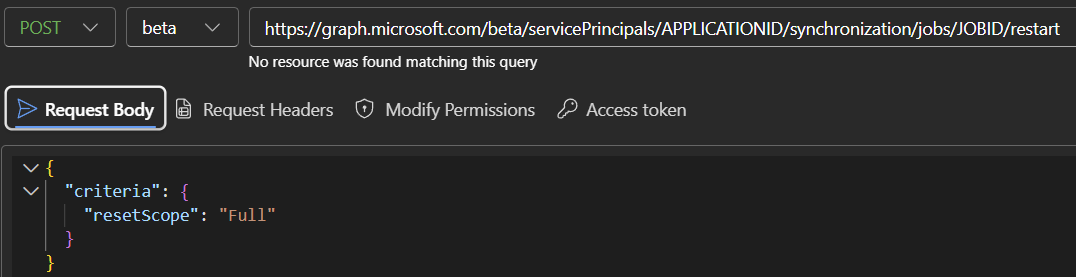
Once you’ve granted the permissions, create a POST request to the following URL, replacing APPLICATIONID and JOBID with the appropriate values for your application (the service principal ID and the provisioning job ID):
1
https://graph.microsoft.com/beta/servicePrincipals/APPLICATIONID/synchronization/jobs/JOBID/restart
4. Use the reset body
In my case, the request body looked like this, though other reset scopes are also available.
1
2
3
4
5
{
  "criteria": {
    "resetScope": "Full"
  }
}
A Full reset clears all synchronization-related state, including caches, watermarks, quarantines, and pending deletions. It effectively forces the service to start a complete reprovisioning cycle for all users and objects.
Conclusion
This approach saved me from having to delete and recreate the entire application setup.
It’s a quick and effective way to recover from broken or stale SCIM mappings without losing your SSO configuration.
Further Reading